
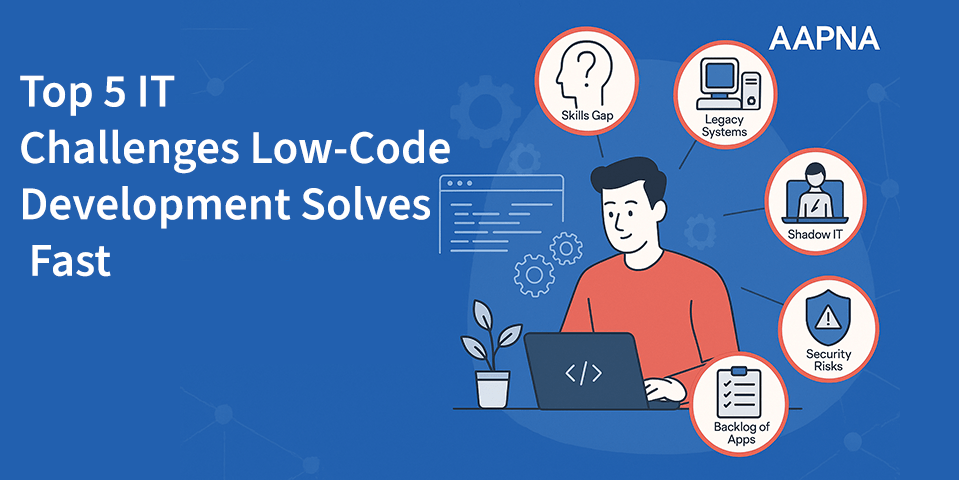
Why This Matters to IT Teams Now
Every IT leader I speak with today shares the same pain: endless app requests, backlogs that never shrink, and a growing dependence on overstretched developers. Business teams want solutions yesterday, while IT is left firefighting.
In my 15+ years of working with IT teams, I’ve seen backlogs stretch for months — sometimes just for simple workflow apps. This gap between business urgency and IT capacity is exactly why low-code has caught fire. What used to take quarters can now be delivered in weeks.
Gartner predicts that by 2025, 70% of new enterprise applications will be developed using low-code or no-code technologies — up from less than 25% in 2020.” 5 IT Challenges Low-Code Can Solve Instantly
1. Application Backlog & Slow Delivery
Most IT teams are overwhelmed with requests. What frustrates business leaders isn’t always the complexity of the apps, but the long wait times. A simple workflow or approval tool can take months to deliver because developers are tied up with critical, complex projects.
Low-code platforms change the equation by offering drag-and-drop interfaces, reusable templates, and prebuilt components. This allows teams to deliver functional apps quickly without starting from scratch. IT can then redirect senior developers to higher-value tasks.
Forrester found that low-code development speeds up app delivery by 5–10x compared to traditional coding.
👉 One of my clients cut development time for a field-ops dashboard from six months to six weeks using low-code. The real win wasn’t speed alone — it was freeing senior developers to focus on core ERP modernization instead of simple forms.
Aactionable tip: Start with a backlog audit. Identify 2–3 “quick win” apps (like approvals, forms, or dashboards) and move them to low-code. This demonstrates value fast and builds stakeholder confidence.
2. Legacy & SaaS Integration Complexity
Every IT leader knows the pain of integration. Connecting an old ERP system to modern SaaS apps can require endless custom coding, brittle middleware, and expensive consultants. The result? Projects drag, and IT budgets get drained.
Most low-code platforms now ship with prebuilt connectors and APIs. Instead of hardcoding integrations, teams configure workflows visually. Event-driven triggers further simplify automation, reducing the reliance on custom middleware.
A MuleSoft survey reported that 70% of IT leaders cite integration challenges as the biggest barrier to digital transformation .
Actionable tip: Use low code for common integration patterns (CRM ↔ ERP, HR ↔ payroll, SaaS ↔ database). For highly complex integrations, pair low code with pro-code extensions. Always document data flows and maintain API-first architecture to avoid future lock-in.
3. Shadow IT & Governance Gaps
When IT can’t deliver fast enough, employees take matters into their own hands. Spreadsheets, Access databases, and rogue SaaS apps pop up everywhere. This “shadow IT” feels productive in the short run but creates security, compliance, and audit nightmares down the line.
With low-code platforms, IT can provide employees a sanctioned environment to build apps while maintaining oversight. Features like role-based access control (RBAC), audit logs, and secure data connectors bring unsanctioned innovation back under governance.
Gartner estimates that shadow IT accounts for 30–40% of IT spending in large enterprises.
I’ve watched shadow IT spiral out of control when employees didn’t have a sanctioned path. Once IT rolled out a governed low-code environment, the same employees became champions of innovation instead of compliance risks.
Actionable tip: Don’t fight shadow IT with restrictions alone. Instead, channel it. Give employees tools, training, and clear guidelines. Establish a Center of Excellence (CoE) to create templates, review apps, and maintain consistency.
4. Skills Gap & Developer Overload
Skilled developers are scarce, and hiring takes time. Meanwhile, IT is clogged with small requests — approval flows, trackers, or dashboards — that don’t justify pulling in senior engineers. The result? Developers are frustrated, and the business feels neglected.
With low-code, citizen developers (business technologists) can safely handle routine apps. IT shifts from being the sole builder to becoming an enabler and coach, reviewing and governing apps while business teams take ownership of smaller solutions.
IDC predicts That by 2026, 750 million new applications will be built worldwide — more than the total number built in the last 40 years — and low-code will be critical to meeting that demand (IDC).
Actionable tip: Set boundaries. Train citizen developers for low-risk use cases and have IT review security-sensitive apps. A “hybrid model” — citizen devs for quick wins, IT for complex builds — balances speed with safety.
5. Security, Compliance & Quality Consistency
Inconsistent security measures across apps are a recipe for trouble. Many IT leaders worry that democratizing development could increase risks, with employees unknowingly creating compliance gaps or insecure apps.
Modern low-code platforms embed security, compliance, and quality controls at the platform level. From SSO (single sign-on) to audit trails and role-based permissions, these platforms ensure apps meet enterprise standards without reinventing the wheel each time.
OWASP warns that misconfigured low-code/no-code apps are a growing enterprise attack surface, citing risks like broken access control and insecure APIs (OWASP).
Actionable tip: Standardize security early. Create reusable security modules, enforce code reviews, and use automated testing pipelines. Remind teams that low-code apps are still software — they deserve the same scrutiny as custom code.
Implementation Playbook for IT Leaders
Rolling out low-code in an enterprise isn’t just about buying licenses — it’s about setting the right foundation, so that speed doesn’t come at the cost of security or quality. Here’s a playbook I’ve seen work consistently in organizations over the years:
Pilot Small (Quick Wins First): Don’t start with your most complex system. Begin with a simple, high-impact use case like an approval workflow, internal dashboard, or employee self-service tool. The goal is to prove value quickly, showcase results to leadership, and build momentum.
Set Guardrails Early: Governance can’t be an afterthought. Define role-based access, security logging, and audit policies from day one. Establish clear rules about what business users can build on their own versus what requires IT oversight. This prevents chaos down the road.
Build Hybrid Teams: Pair citizen developers (business technologists) with IT mentors. This creates a collaborative model where business users get the speed they want while IT ensures compliance and architecture standards are met. Over time, this builds trust between IT and business units.
Create Templates & Reusable Assets: Once a pilot succeeds, don’t reinvent the wheel. Turn that app into a template others can use. Document best practices, reusable components, and standard integrations. This saves time for future builds and ensures consistency across the enterprise.
Scale with a Center of Excellence (CoE): As adoption grows, create a CoE responsible for training, certifying, and supporting business users. The CoE can enforce security, manage platform performance, and act as a knowledge hub — turning scattered experimentation into an organized, enterprise-wide capability.
Closing Thoughts
Low code won’t replace developers, but it will reshape IT’s role. Instead of bottlenecks, IT leaders become enablers — providing safe, fast, and flexible tools for the business. The organizations that succeed are the ones that treat low-code as a strategic layer, not a shortcut — using it to accelerate routine delivery while keeping mission-critical systems under expert hands.